> ## Documentation Index
> Fetch the complete documentation index at: https://docs.lyzr.ai/llms.txt
> Use this file to discover all available pages before exploring further.
# Voice Agents
Lyzr Studio's **Voice Agents** are designed for high-performance, low-latency conversational AI. By combining state-of-the-art Large Language Models (LLMs) with advanced Text-to-Speech (TTS) and environmental audio effects, you can create agents that are indistinguishable from human operators in specific workflows.
## Getting Started
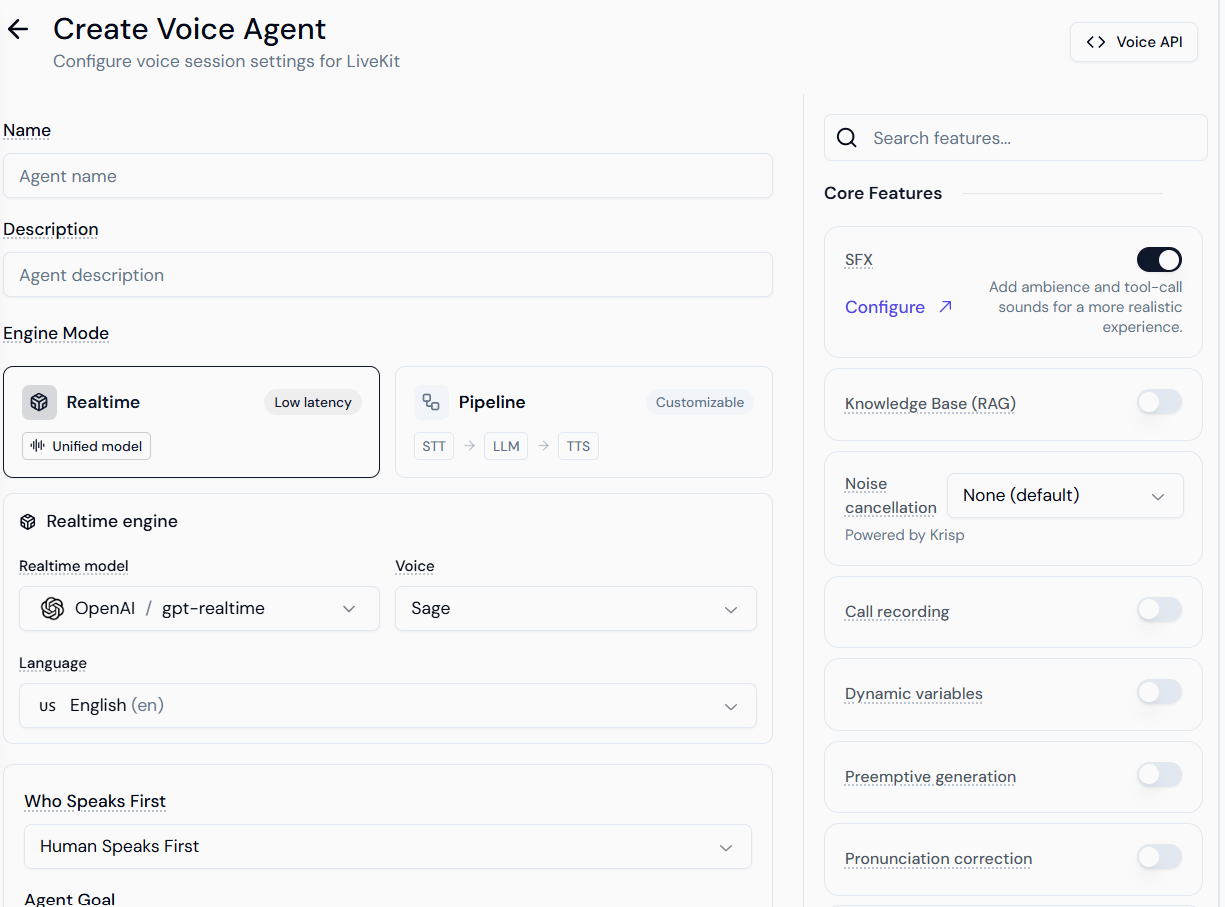
To access the Voice module, navigate to the **Voice** icon in your Lyzr Studio sidebar. From the dashboard, you can monitor live call metrics, manage existing agents, or click **+ Create Agent** to launch the configuration studio.
 ***
## 1. Engine Modes: Choosing Your Architecture
The "Engine Mode" determines how the agent "thinks" and "speaks." This is the most critical decision for your agent's performance.
***
## 1. Engine Modes: Choosing Your Architecture
The "Engine Mode" determines how the agent "thinks" and "speaks." This is the most critical decision for your agent's performance.
 ### Realtime Engine (Unified Model)
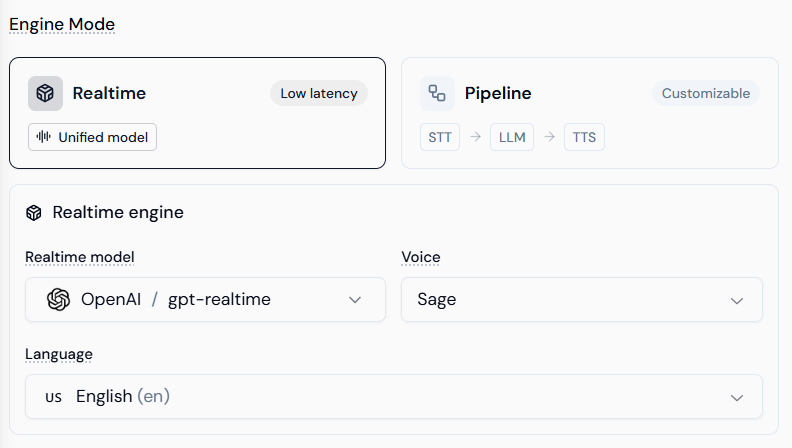
The Realtime engine uses models like **OpenAI gpt-4o-realtime**. Unlike traditional stacks, this model processes audio-to-audio directly.
* **Pros:** Lowest possible latency (sub-500ms), better handling of interruptions, and natural emotional inflection.
* **Configuration:** Select your **Realtime Model**, **Voice** (e.g., Sage, Ash), and **Language**.
### Pipeline Engine (Customizable Stack)
The Pipeline engine allows you to modularize the agent's "senses."
### Realtime Engine (Unified Model)
The Realtime engine uses models like **OpenAI gpt-4o-realtime**. Unlike traditional stacks, this model processes audio-to-audio directly.
* **Pros:** Lowest possible latency (sub-500ms), better handling of interruptions, and natural emotional inflection.
* **Configuration:** Select your **Realtime Model**, **Voice** (e.g., Sage, Ash), and **Language**.
### Pipeline Engine (Customizable Stack)
The Pipeline engine allows you to modularize the agent's "senses."
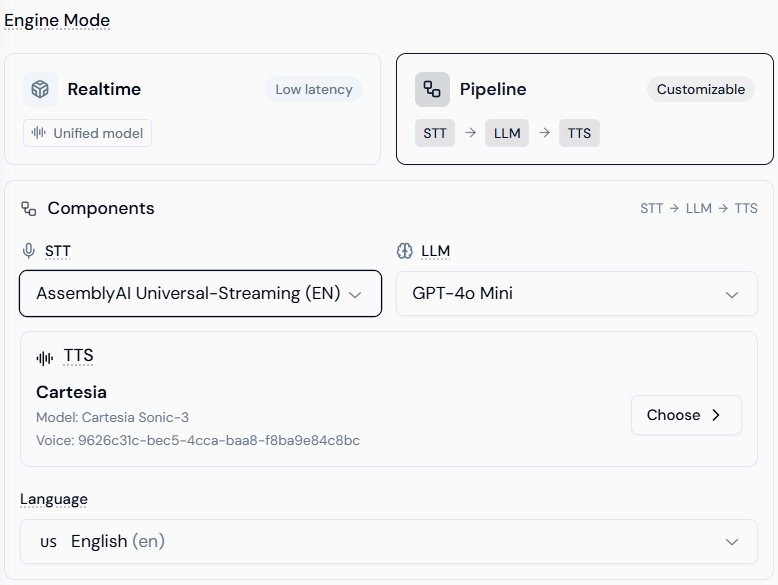 * **STT (Speech-to-Text):** Converts user audio to text. Features providers like **AssemblyAI** for robust streaming transcription.
* **LLM:** The reasoning core. You can use lighter models like **GPT-4o Mini** to balance cost and speed.
* **TTS (Text-to-Speech):** Converts response text back to audio. Providers like **Cartesia** offer high-fidelity, ultra-fast voice generation with specific Voice IDs.
***
## 2. Behavioral Configuration
Define the "who, what, and how" of your agent. This section acts as the system prompt for the voice interaction.
* **STT (Speech-to-Text):** Converts user audio to text. Features providers like **AssemblyAI** for robust streaming transcription.
* **LLM:** The reasoning core. You can use lighter models like **GPT-4o Mini** to balance cost and speed.
* **TTS (Text-to-Speech):** Converts response text back to audio. Providers like **Cartesia** offer high-fidelity, ultra-fast voice generation with specific Voice IDs.
***
## 2. Behavioral Configuration
Define the "who, what, and how" of your agent. This section acts as the system prompt for the voice interaction.
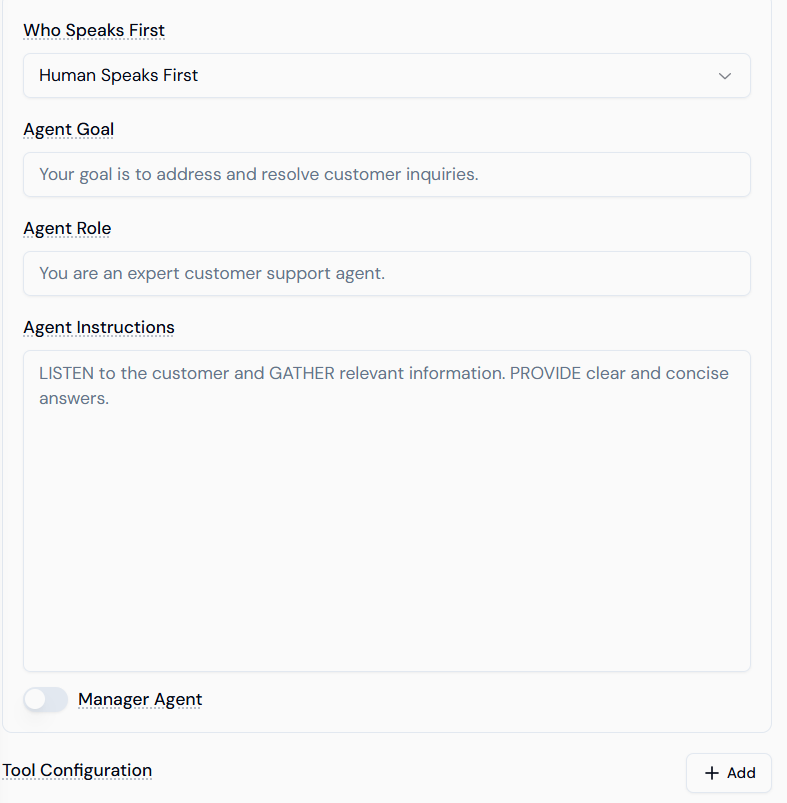 * **Who Speaks First:** \* **Human Speaks First:** The agent waits for the user to initiate (best for inbound support).
* **Agent Speaks First:** The agent greets the user immediately (best for outbound sales or reminders).
* **Agent Role & Goal:** Provide high-level context. For example, "You are a specialized medical receptionist" with the goal to "Schedule follow-up appointments."
* **Agent Instructions:** Detailed logic. Use this area to define:
* **Tone:** (e.g., "Professional yet empathetic").
* **Constraints:** (e.g., "Do not discuss pricing; transfer to a manager for that").
* **Flow:** (e.g., "First ask for the Order ID, then verify the zip code").
***
## 3. Core Features & Audio Realism
The sidebar provides advanced toggles to fine-tune the user experience and technical reliability.
* **Who Speaks First:** \* **Human Speaks First:** The agent waits for the user to initiate (best for inbound support).
* **Agent Speaks First:** The agent greets the user immediately (best for outbound sales or reminders).
* **Agent Role & Goal:** Provide high-level context. For example, "You are a specialized medical receptionist" with the goal to "Schedule follow-up appointments."
* **Agent Instructions:** Detailed logic. Use this area to define:
* **Tone:** (e.g., "Professional yet empathetic").
* **Constraints:** (e.g., "Do not discuss pricing; transfer to a manager for that").
* **Flow:** (e.g., "First ask for the Order ID, then verify the zip code").
***
## 3. Core Features & Audio Realism
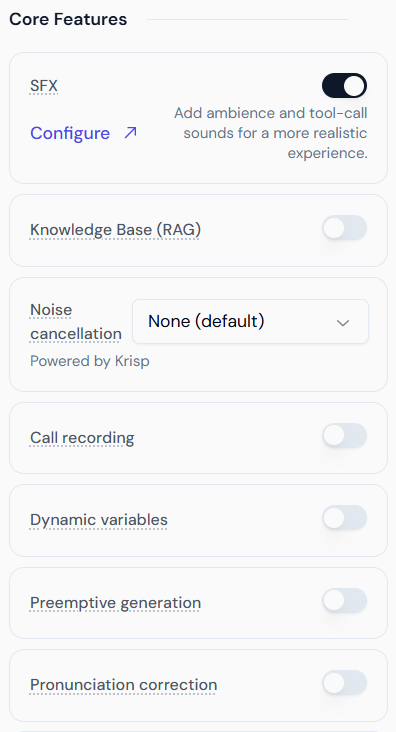
The sidebar provides advanced toggles to fine-tune the user experience and technical reliability.
 ### SFX & Ambience (Audio Grounding)
Raw AI voices can sometimes sound "sterile." Adding SFX creates a realistic acoustic environment.
### SFX & Ambience (Audio Grounding)
Raw AI voices can sometimes sound "sterile." Adding SFX creates a realistic acoustic environment.
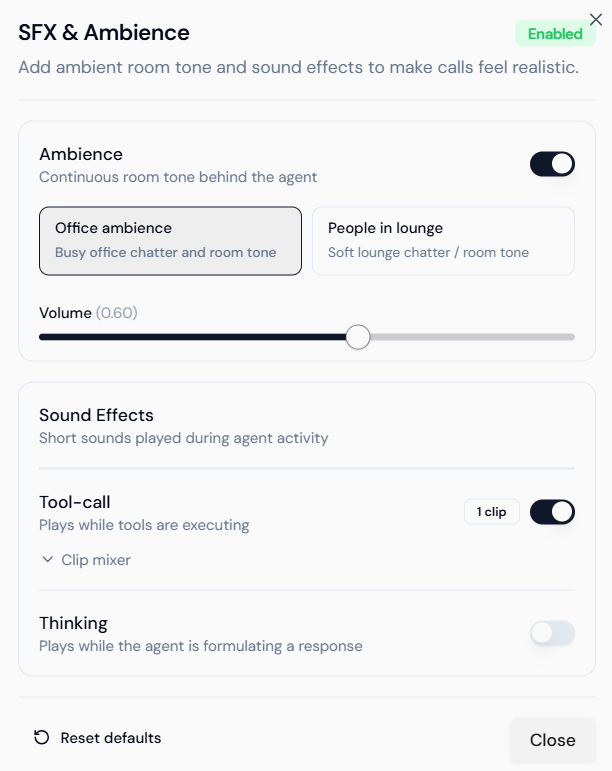 * **Ambience:** Adds a continuous background "room tone."
* **Office Ambience:** Subtle keyboard clicks and distant chatter.
* **People in Lounge:** Soft environmental murmur.
* **Tool-call Sounds:** Plays a short audio clip (e.g., a "processing" chime) when the agent is executing a function like booking a calendar or checking a database.
* **Thinking Sounds:** Fills the silence during LLM processing with subtle human-like cues.
### Knowledge Base (RAG)
Connect your agent to a Lyzr Knowledge Base. When enabled, the agent will perform a vector search on your documents before answering. This is essential for agents handling product support or internal policy inquiries.
### Dynamic Variables & Fallbacks
Variables allow you to inject real-time data into your prompts (e.g., `{{customer_name}}`).
* **Ambience:** Adds a continuous background "room tone."
* **Office Ambience:** Subtle keyboard clicks and distant chatter.
* **People in Lounge:** Soft environmental murmur.
* **Tool-call Sounds:** Plays a short audio clip (e.g., a "processing" chime) when the agent is executing a function like booking a calendar or checking a database.
* **Thinking Sounds:** Fills the silence during LLM processing with subtle human-like cues.
### Knowledge Base (RAG)
Connect your agent to a Lyzr Knowledge Base. When enabled, the agent will perform a vector search on your documents before answering. This is essential for agents handling product support or internal policy inquiries.
### Dynamic Variables & Fallbacks
Variables allow you to inject real-time data into your prompts (e.g., `{{customer_name}}`).
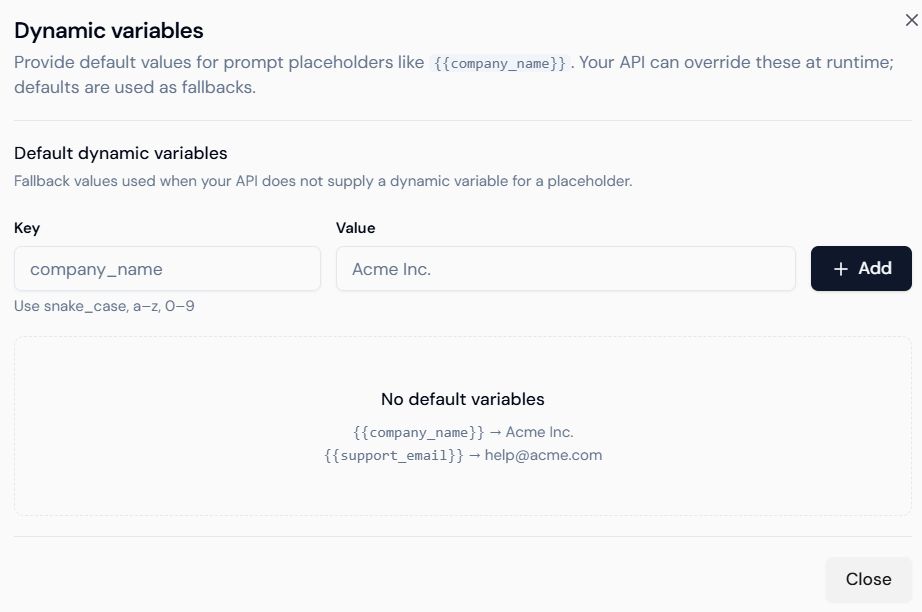 * **Keys:** The placeholder used in your instructions.
* **Values:** The default fallback (e.g., if the API doesn't know the name, it defaults to "Valued Customer").
### Pronunciation Rules
Prevent the AI from mispronouncing brand names or technical acronyms using **SSML**-style text replacement.
* **Keys:** The placeholder used in your instructions.
* **Values:** The default fallback (e.g., if the API doesn't know the name, it defaults to "Valued Customer").
### Pronunciation Rules
Prevent the AI from mispronouncing brand names or technical acronyms using **SSML**-style text replacement.
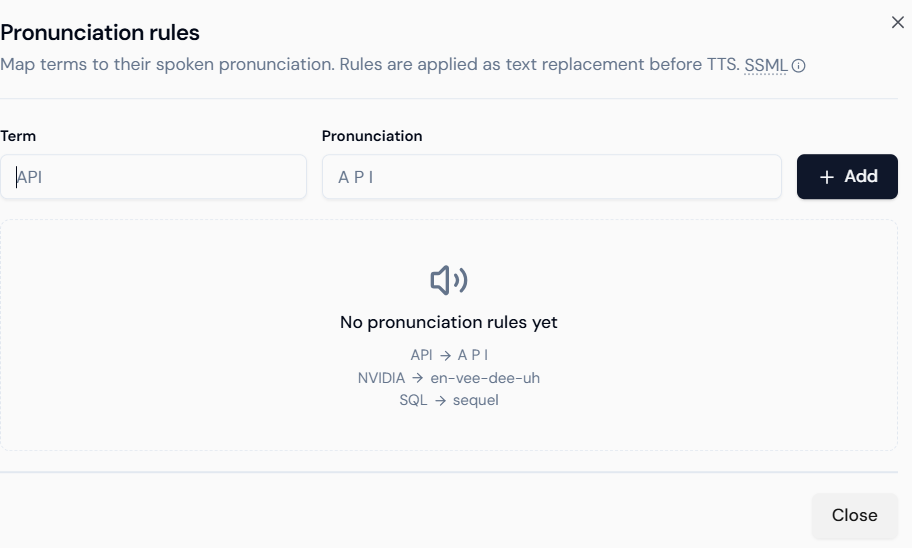 * **Term:** The written word (e.g., "NVIDIA").
* **Pronunciation:** The phonetic breakdown (e.g., "en-vee-dee-uh").
***
## 4. Advanced Stability Features
* **Noise Cancellation (Krisp):** Dramatically improves transcription accuracy in noisy environments (e.g., users calling from a car or a busy street).
* **Preemptive Generation:** The agent starts "streaming" audio as soon as the first few tokens of text are generated, rather than waiting for the full sentence.
* **Call Recording:** Enables full audio logging. Note that you may need to add a "This call is being recorded" disclaimer in your **Agent Instructions** for legal compliance.
***
### Best Practices for Voice Agents
1. **Be Concise:** Users lose track of long lists of spoken options. Keep agent responses under 2-3 sentences.
2. **Handle Interruptions:** Use the **Realtime Engine** if your use case requires the user to frequently interrupt the agent.
3. **Phonetic Testing:** Always test your brand name. If the TTS says it incorrectly, add it to the **Pronunciation Rules** immediately.
* **Term:** The written word (e.g., "NVIDIA").
* **Pronunciation:** The phonetic breakdown (e.g., "en-vee-dee-uh").
***
## 4. Advanced Stability Features
* **Noise Cancellation (Krisp):** Dramatically improves transcription accuracy in noisy environments (e.g., users calling from a car or a busy street).
* **Preemptive Generation:** The agent starts "streaming" audio as soon as the first few tokens of text are generated, rather than waiting for the full sentence.
* **Call Recording:** Enables full audio logging. Note that you may need to add a "This call is being recorded" disclaimer in your **Agent Instructions** for legal compliance.
***
### Best Practices for Voice Agents
1. **Be Concise:** Users lose track of long lists of spoken options. Keep agent responses under 2-3 sentences.
2. **Handle Interruptions:** Use the **Realtime Engine** if your use case requires the user to frequently interrupt the agent.
3. **Phonetic Testing:** Always test your brand name. If the TTS says it incorrectly, add it to the **Pronunciation Rules** immediately.