

Introduction
The Knowledge Base (KB) in Lyzr empowers AI agents to retrieve and utilize both structured and unstructured information for accurate, context-aware responses. It supports various file formats, advanced chunking strategies, and multiple retrieval methods to ensure high-quality information extraction.4Knowledge Base Guide
Learn how to manage data sources for your agents.
Creating and Managing a Knowledge Base
Lyzr provides a streamlined interface via Lyzr Studio to manage Knowledge Bases:Create a Knowledge Base
- Configure embedding, LLM, and vector store credentials.
- Set retrieval and chunking strategies.
- Define a unique name and description.
Manage Content
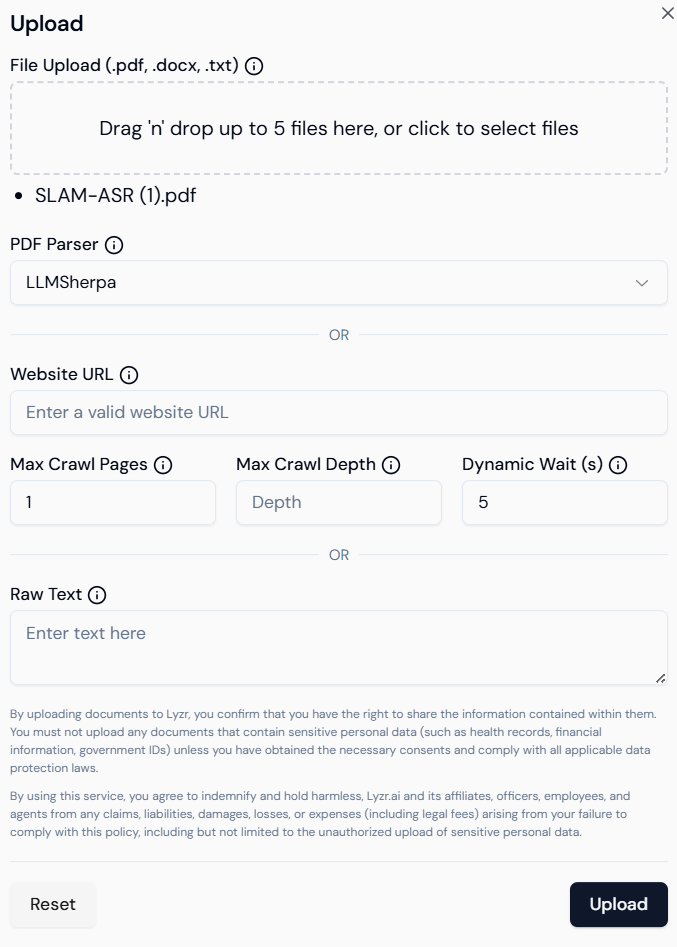
- Add content: Upload documents, enter text, or provide URLs.
- Delete content: Remove outdated or irrelevant entries.
- Update configuration: Change retrieval types or chunk settings anytime.
Supported File Types
The following formats can be uploaded to a Lyzr KB:.pdf.doc,.docx.txt- Website URLs (via scraping)
Upload Limitations
To ensure optimal performance:- Max 5 files at a time
- Each file must be less than 15MB
- For better results, prefer batch-wise uploading
Chunking Strategy
Chunking splits documents into smaller parts for better semantic indexing.Parameters:
- Number of chunks: Number of sections generated.
- Chunk size: Controls the length of each chunk.
- Overlap: Adds context continuity across chunks.
Available Retrieval Types
Lyzr offers multiple retrieval mechanisms to suit different information needs:a) Basic Retrieval
- Default vector similarity-based retrieval.
- Great for general knowledge lookups.
b) MMR (Maximal Marginal Relevance)
- Balances diversity and relevance.
- Reduces duplicate content in retrieved results.
c) HyDE (Hypothetical Document Embeddings)
- Generates synthetic documents to simulate context.
- Boosts open-ended query results.
Retrieval-Augmented Generation (RAG)
Lyzr seamlessly integrates RAG to generate more accurate and grounded answers using knowledge base content.RAG Workflow
- Query Reception
Agent receives a user question or instruction. - Document Retrieval
Top-N relevant documents are fetched using vector similarity. - Reranking & Filtering
Results are optionally refined for relevance. - Prompt Assembly
Retrieved context is combined with the original question. - Generation
LLM generates a grounded response using the assembled prompt. - Citation & Delivery
Output includes references to source documents for transparency.
Core Components
- Vector Store: Stores semantic vectors (e.g., Pinecone, FAISS, Qdrant)
- Embedding Model: Transforms content into vectors (e.g., OpenAI, Cohere)
- Reranker: Improves result ordering (optional)
- Prompt Template: Defines how context + question are structured
- Citation Module: Appends references to the output
Simulator Testing
Once a Knowledge Base is created and populated:- Navigate to the Agent Simulator in Lyzr Studio.
- Select the agent connected to your KB.
- Enter test prompts to evaluate:
- Retrieval accuracy
- Answer relevance
- Citation correctness
- Adjust retrieval type, chunking, or KB content as needed.
Lyzr’s Knowledge Base system is a robust tool for enabling intelligent, grounded, and flexible AI responses. With support for diverse file types, retrieval strategies, and RAG integration, it provides a powerful foundation for domain-specific agents. Optimize your AI workflows by:
- Configuring proper chunking
- Choosing the right retrieval type
- Uploading high-quality content in batches
- Testing thoroughly with the simulator
1. Choose Knowledge Base Type
Before creation, you’ll be prompted to choose the type of Knowledge Base:- Classic (for general documents and text)
- Knowledge Graph (for relationship-heavy data)
- Semantic Model (for structured databases)
2. Create a Classic Knowledge Base
Define your new KB by entering essential details:- Name: A meaningful title (e.g., “Marketing FAQs”).
- Description: Briefly explain the purpose of this KB.
- Vector Database: Choose where embeddings will be stored — options include Qdrant, Weaviate, or others integrated with Lyzr.
3. Add Content from Multiple Sources
Lyzr supports uploading or linking multiple data types. Content types supported:- File Upload: PDF, DOCX, TXT, CSV, JSON.
- Web Links: Direct URLs of documentation pages or websites.
- Copy-paste text: Manually input chunks of content.
- Content is split into semantically coherent chunks.
- Embeddings are generated using LLMs.
- The vector store indexes these chunks for fast retrieval.
4. Query & Test
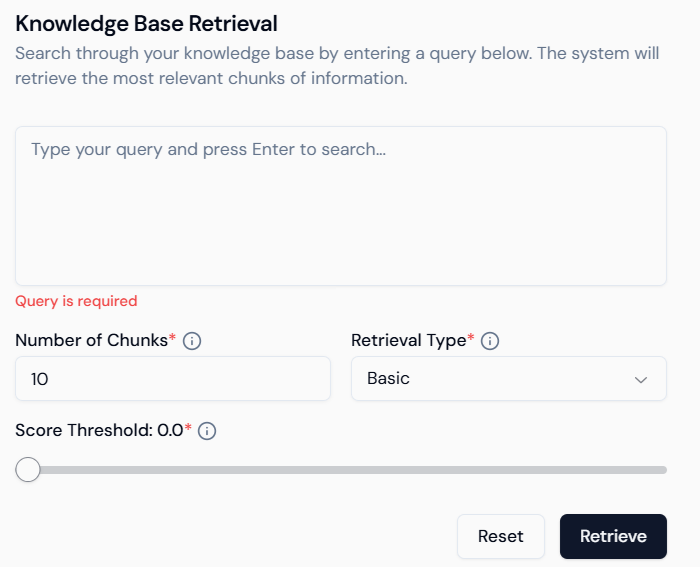
Once your Classic KB is populated, test it directly inside Studio:- Search Input: Ask natural language questions.
- Chunk Count: Control number of results returned (default: 10).
- Retrieval Type: Basic (similarity-based).
- Score Threshold: Filter out low-score responses for higher precision.
5. Integrate with Agents
The Classic KB can now be connected to Lyzr agents:- Choose the KB as a data source during agent creation.
- The agent will use this KB to perform Retrieval-Augmented Generation (RAG).
- No coding required — fully visual interface for mapping knowledge and deploying agents.
Summary
| Feature | Description |
|---|---|
| Fast Setup | Upload or link content in minutes. |
| Cost-Effective Retrieval | Optimized for quick queries and basic document Q&A. |
| No-Code Interface | Simple visual UI for all KB operations. |
| Agent-Ready | Seamlessly connect to agents for real-time semantic Q&A. |
The Classic Knowledge Base is best suited when you want to get started fast with document-based Q&A and lightweight RAG — no database or complex configuration needed.